How to Build AI Apps for Your Business (Complete Guide)
Most founders waste months on the wrong thing. Here's the exact system for building a working AI app, without a dev team, a big budget, or a CS degree.
Building AI Apps Has Nothing to Do With AI
I built a working AI app from scratch. No dev team. No CS degree. No agency.
A YouTube script writer I use in my own business, built over a weekend using free tools.
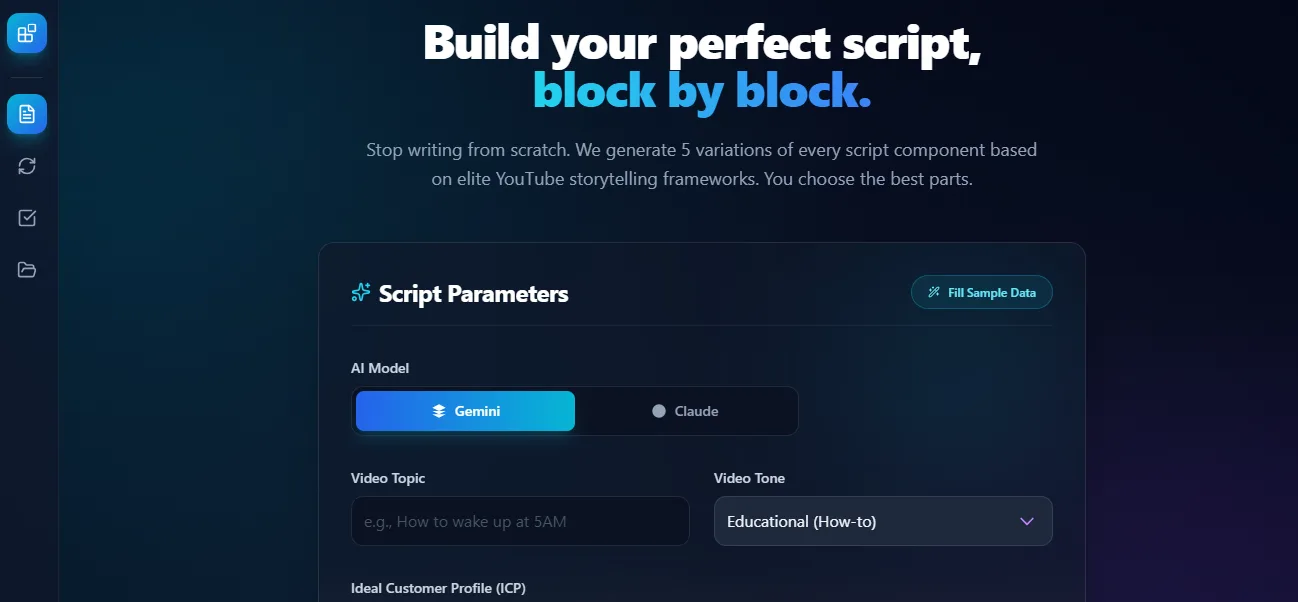
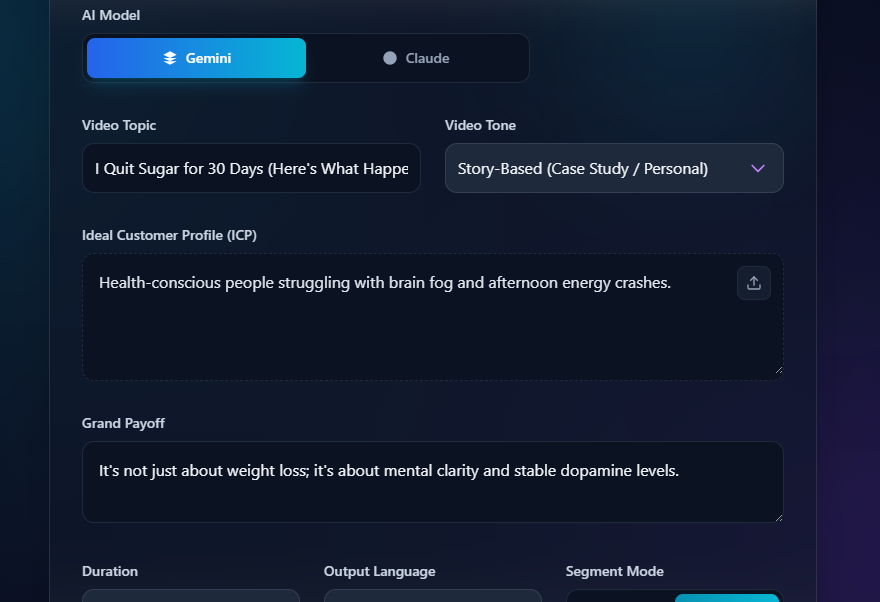
The YouTube Script Writer I built from scratch. Choose your AI model, drop in a topic, define your audience, and get a full script ready to film. Built in a weekend. Zero dev team.
Here's the thing most guides won't say directly: building AI apps is not about AI.
It's about designing a system that uses AI to create real value. The AI is one part. The system is everything.
Get that wrong and it doesn't matter which tool you use. You'll keep building things that almost work.
Part 1: What Problem Are You Actually Solving?
Most founders start with the wrong question.
They ask: "What AI can I build?"
Wrong question. Wrong starting point. Wrong results.
Start here instead: "What problem is costing me the most time this week?"
That single shift separates the founders who ship something useful from the ones who spend three months clicking around platforms with nothing to show for it.
Here's what an AI app actually is.
An AI application is a system that takes input, processes it intelligently, and produces valuable output for a user.
Every AI app, no matter how impressive it looks, follows one structure:
User → Interface → Backend Logic → AI Model → Data → Output → Feedback Loop
Six layers. That's it. Every AI product you've ever used is a version of this.
Here's what each layer does:
User: the person interacting with your app. Know exactly who this is before you write a single prompt. Not "SMB owners in general." One specific person with one specific problem.
Interface: where interaction happens. A chat window, a form, a dashboard, a button. This is what your user sees and touches. Most founders underinvest here and wonder why nobody uses their app.
Backend logic: how the system processes requests. The rules, the conditions, the workflow. This is where your thinking lives, not in the AI model.
AI model: the intelligence layer. Text, image, prediction. This is one layer inside the system. Not the system itself.
Data: what makes your AI useful instead of generic. Without your data, your AI gives the same answer it gives everyone else. Data is often the real competitive advantage.
Output: what the user receives. A report, a draft, a recommendation. The format matters as much as the content.
Feedback loop: how your system gets better over time. Without this, your app becomes obsolete.
Most founders obsess over the AI model layer and ignore everything else.
That's exactly why most AI apps fail.
And the window is closing. According to the U.S. Chamber of Commerce's 2024 technology report, 40% of U.S. small businesses now use generative AI — nearly double the rate from just one year earlier. Your competitors are not waiting.
Think of it this way: AI = engine. System = car. UX = driver experience. Problem = destination.
Everyone focuses on the engine. Winning builders design the whole car.
What type of app should you build?
There are five categories. Know which one you're in before you build anything.
Generative apps create content. Blog generators, email writers, script writers, ad copy tools. The most common starting point for founders.
Analytical apps analyse and give insights. UX audits, SEO analysers, landing page reviewers. You give them something to look at. They tell you what to fix.
Automation apps replace repetitive tasks. Support bots, CRM assistants, workflow automation. For most SMB owners, this is the highest-ROI starting point.
Decision systems help users make smarter choices. Lead scoring, pricing optimisation, recommendations. More complex to build. Extremely high value when done right.
Agent-based systems take multi-step actions across tools without you pressing a button. The most powerful category. Also the most complex. Do not start here.
Which one should you build first?
The one that removes the most pain from your week. Not the most exciting one. The most painful one.
Find it in 10 minutes: write down every task you did in your business this week. Circle anything you've done more than three times in the last month. Ask: "Could someone follow a checklist to do this?"
If yes, AI can handle it. Or at least 80% of it.
The shortcut: think back to the last time you said "I hate doing this." That's your use case.
Part 2: How Do You Build It Without Wasting Your Weekend?
You have a clear problem. Now you need a clear process.
Here's the one I use. Eight steps. Don't skip the first one. It's the one that saves you the most time.
Step 1: Write your App Brief before you open any tool.
This is the step most guides skip. It's the most important one.
Your App Brief answers four questions:
What does the app do in one sentence? What does the user give it? What does the user get back? What does it look like when it works perfectly?
Example from my YouTube script writer:
"Takes a video topic and writes a complete 1,500-word script in my style. Input: topic, target audience, three key points. Output: full script with hook, body, and CTA. Works perfectly when I can film within 30 minutes of pressing the button."
Ten minutes to write. Saves ten hours of building in the wrong direction.
Step 2: Define input and output precisely.
Vague input = vague output. Every time.
Know exactly what goes in before you write a single prompt.
Good: Input is a landing page URL. Output is a UX audit with five specific improvement suggestions ranked by impact.
Bad: Input is "something about the website." Output is "feedback."
Precision here is the difference between an app that works and one that produces impressive-looking nonsense.
Step 3: Choose your model strategy.
Three options. Pick the right one for where you are now.
API-based models (Claude, ChatGPT, Gemini): fast, easy, scalable. Start here. Almost every successful AI app starts with an API.
Open-source models: flexible, customizable. Worth exploring once your idea is validated and you need more control.
Custom-trained models: high performance, expensive, complex. Don't go near this until you have real users giving real feedback.
Start with the simplest model that solves the problem. Upgrade only when you hit a real limit.
Step 4: Design your AI logic.
This is where most of the real value lives. And where most guides give up on you.
Single prompts work for simple tools. They break fast for anything more useful.
Advanced apps use workflows.
Simple flow: User input → prompt → AI → output.
Advanced flow: User input → data retrieval → prompt with context → AI processing → structured output.
Here's a real workflow for a landing page analyzer:
Step 1: Extract content from the URL. Step 2: Analyze structure and hierarchy. Step 3: Evaluate UX and conversion signals. Step 4: Generate specific improvement suggestions. Step 5: Format into a clean, actionable report.
Each step builds on the last. The output is more reliable, more specific, and more useful than any single prompt could produce.
Multi-step workflows are the real differentiator between AI tools that impress in a demo and ones that actually run inside a business every day.
Step 5: Build your backend.
The backend connects all six layers together.
You don't need to build it from scratch. And you're not alone in taking this route. Forrester reports that 87% of enterprise developers already use low-code platforms for at least some of their work. If professional developers rely on these tools, a business owner building their first AI app absolutely should.
Tools like n8n, Make.com, and Relevance AI let you build backend logic visually without code. If you want more flexibility, Claude Code** with **Cursor lets you describe what you want in plain English. Claude writes the code. You review the output.
Your job is knowing what you want to build, not how to code it.
Step 6: Build the frontend. Take it seriously.
This is your biggest competitive advantage.
AI products fail because of bad UX, not bad AI.
It doesn't matter how intelligent your model is if using the app feels confusing or slow. Your reader will close the tab and never come back.
Four things to focus on: clarity (the user always knows what to do next), speed (don't make them wait), simplicity (remove everything non-essential), and trust (prove the output is reliable).
One rule: format your output. Turn raw AI text into a structured report with sections, labels, and clear next actions. That formatting alone makes your app feel ten times more credible.
Step 7: Deploy it.
Deployment makes your app accessible outside your own laptop.
Vercel, AWS, and Firebase are the most common options. If you're on no-code tools, deployment is usually built in.
Focus on speed first. Reliability second. Scalability third. A fast, reliable simple app beats a slow, complicated one every single time.
Step 8: Run three test cycles. Not thirty.
Your first version will be wrong. That's not a failure. That's how building works.
Cycle 1: Run it on a real example from your business. Note every place it breaks. Cycle 2: Fix the biggest problem. Run it again. Cycle 3: Fix the second biggest problem. Run it once more.
Three cycles. Then use it. Refine based on what actually breaks in the real world, not what you think might break in theory.
My YouTube script writer was wrong on day one. Wrong structure, robotic tone, weak hooks. But it worked. It produced something.
Something you can fix is worth more than a perfect idea you never ship
Part 3: How Do You Make Sure It Actually Works in Your Business?
Building a working app is step one. Building one that delivers real ROI is a different challenge.
Here's what separates AI apps that become business assets from the ones that get abandoned after two weeks.
Validate before you build. Every time.
This is the mistake that costs founders the most time and money. They build first. Then they find out nobody wanted it.
Before you build anything, test demand.
Post this somewhere your target audience lives: "I'm building a tool that analyses your website and gives you specific recommendations to improve conversions. Want early access?"
Collect responses. Ten people saying yes is enough signal to build. Nobody responding is six weeks of your life saved.
Step 1: Post the idea. Step 2: Collect responses. Step 3: Build only after validation.
This sounds obvious. Almost nobody does it.
Choose the right business model from the start.
The wrong model kills a good product.
SaaS (subscription): monthly recurring access. Best for apps that deliver ongoing value, like weekly reports or always-on automations.
Pay-per-use: users pay per request. Best for variable usage apps like one-off audits or document analysers.
Freemium: free tier plus paid upgrades. Works when users need to experience value before they pay. Higher acquisition, lower conversion rate. Only use this if your free tier is genuinely useful on its own.
Service plus AI: you use the app to deliver a service faster and at higher margin. You charge for the outcome, not the software. This is the fastest path to revenue for most founders. You're selling results, not tools.
Match your model to your use case:
Recurring daily use = SaaS. Occasional high-value task = pay-per-use. Need to prove value first = freemium. Selling outcomes to clients = service plus AI.
The five mistakes that kill most AI apps.
Know these before you build. Not after.
Starting with the tool instead of the problem. The tool is never the starting point. The problem is. Always.
Building something generic. "AI writer" loses every time to "AI that writes high-converting landing pages for SaaS startups." Niche wins. Generic loses. No exceptions.
Ignoring UX. Your AI can be brilliant. Your app can still fail. A confusing or slow experience kills trust faster than anything else. Experience matters more than intelligence.
Overcomplicating the first version. One input. One output. One use case. Ship that. Add complexity only after real users are using it.
Building without validation. Test demand first. Always. No exceptions.
Frequently Asked Questions
-
How do I build AI apps for free? You can build a fully working AI app without spending a pound. Google AI Studio is free. Cursor has a free tier. Make.com has a free plan for small workflows. Claude and ChatGPT both offer free access to build and test. The only cost worth considering early on is a paid AI subscription (around $20/month) for higher usage limits. Most founders don't need that until they're running the app daily.
-
How do I build an AI agent with ChatGPT? Open ChatGPT and go to the GPT Builder. Describe what you want your agent to do in plain English. Name it, give it instructions, add example inputs. Test it with real questions from your business. The GPT Builder gets you a working agent in under an hour. It has limits compared to Make.com or n8n, but it's the fastest way to prove an idea works before building something more robust.
-
Do I need to know how to code to build AI apps? No. Make.com, Relevance AI, and Google AI Studio require zero coding. Even Claude Code and Cursor are designed for non-technical founders. You describe what you want. The AI handles the code. Your job is knowing what you want to build, not how to write the code yourself.
-
How long does it take to build a first AI app? One weekend, if you follow the process in this guide. Most founders waste weeks because they start with the tool instead of the problem. Once you have a clear App Brief, the build is fast. Budget three to four hours for your first version. Two more cycles of testing gets you something you'd actually use in your business.
-
What is the difference between an AI app and an AI agent? An AI app takes input, runs it through a model, and returns output. You trigger it manually. An AI agent does the same thing but takes actions, makes decisions, and runs automatically without you pressing a button. Start with an app. Add the agent layer once your core logic is working and you understand exactly what the system needs to do.
-
How do I build AI powered apps that connect to my existing tools? Use Make.com or n8n. Both connect to hundreds of apps: Gmail, Slack, Notion, Airtable, Shopify, most CRMs. You build a workflow that pulls data from one tool, passes it through an AI model, and pushes the output somewhere else. No custom integration needed. Most common business stacks are already supported out of the box.